The 60m HDMI KVM Extender(by single Cat5e/6,EDID) extender provides extension of HDMI signals long distances over a single CAT6 cable , it supports high resolution up to 1080p and keyboard/mouse signal transmission. The extender can use for a wide range of applications requiring long distance transmission of high resolution with high quality by its good stability and powerful security.
Features:
1. Transmits HDMI video and audio signals up to 60m over a single CAT6 cable;
2. Support video resolution up to 1920*1080@60Hz, 3D signal;
3. Support keyboard and mouse signal transmission;
4. Support copy EDID function, can match many kind display device;
5. Compliance with HDMI 1.3 and HDCP 1.2 standard;
6. High compatibility, can auto-match source and display device;
7. Built-in automatic adjustment system, make the image smooth, clear and stable;
8. Built-in ESD protection system;
9. Simple to install, plug and play;
Specifications:
Panel:
Receiver:
Package list:
1. HDMI transmitter ............. 1 pcs
2. HDMI receiver ................ 1 pcs
3. Mini USB cable................ 1 pcs
4. Power adapter ................ 2 pcs
5. User manual ................... 1 pcs
Installation:
1.Connect the HDMI input source (such as HD-DVD,PS3,STB etc. ) to transmitter.
2.Connect a CAT6 cable from UTP port of transmitter to UTP port
of receiver
3.Connect the HDMI sink(such as HD-LCD,HD-DLP)to receiver,
4.Connect the transmitter UTP port to the receiver UTP port using a single CAT6 cable.
5.Connect transmitter PC IN port to PC using mini USB cable.
6.Connect USB keyboard and mouse to Receiver K/M port.
7.Power on Transmitter and Receiver.
Features:
1. Transmits HDMI video and audio signals up to 60m over a single CAT6 cable;
2. Support video resolution up to 1920*1080@60Hz, 3D signal;
3. Support keyboard and mouse signal transmission;
4. Support copy EDID function, can match many kind display device;
5. Compliance with HDMI 1.3 and HDCP 1.2 standard;
6. High compatibility, can auto-match source and display device;
7. Built-in automatic adjustment system, make the image smooth, clear and stable;
8. Built-in ESD protection system;
9. Simple to install, plug and play;
Specifications:
| Parameter | Description | |
| Video | Standards | HDMI 1.3; HDCP 1.2 |
| Maximum pixel clock | 165MHz | |
| Maximum data rate | 6.75Gbps | |
| Resolution | 1920X1080@60Hz | |
| Connector | HDMI-A | |
| Impedance | 100Ω | |
| USB | Interface | To PC: standard MINI-USB or PS2 To K/M: standard USB, PS2 optional |
| USB Signal | HID Signal | |
| UTP | Interface | RJ45 |
| Transmission distance | CAT6-60m | |
| Other | Power supply | The power adapter: DC 5V/1A |
| Power dissipation | MAX 3W | |
| Temperature | Operating: -5ºC ~ +70ºC | |
| Humidity | Operating: 5% ~ 90% | |
| Dimension | 94.5*71*26mm | |
| The warranty | 1 year free warranty | |
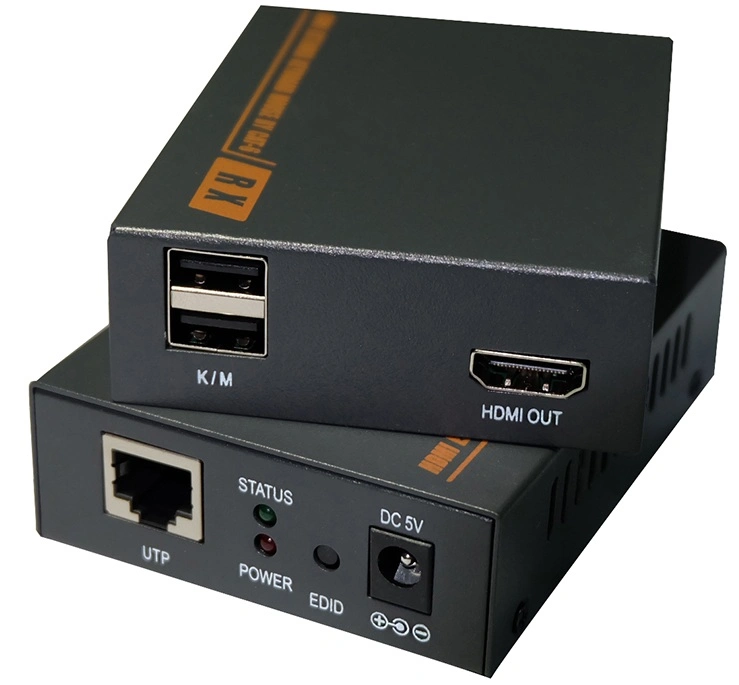
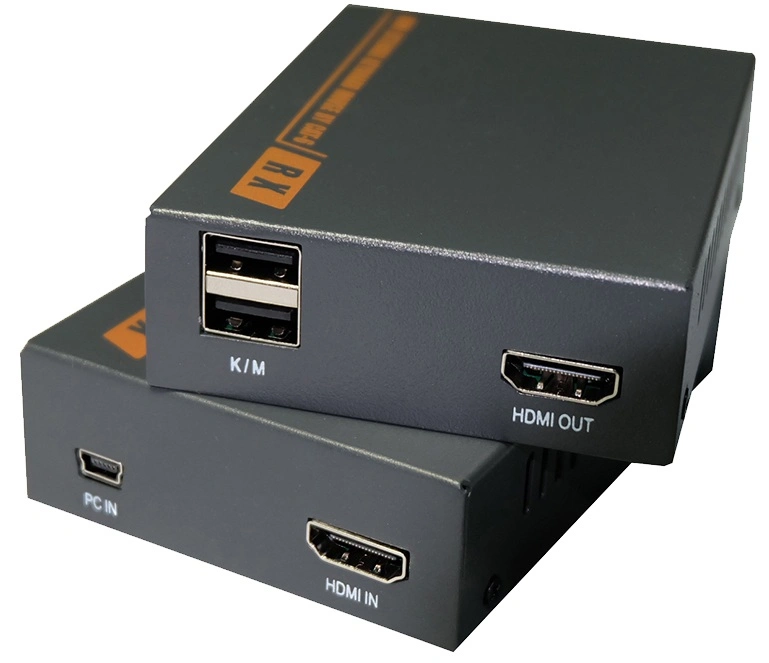
Panel:
Receiver:
| Port name | Description |
| HDMI IN/OUT | HDMI signal input/output |
| UTP | RJ45 port connect cat6. |
| PC IN | Mini USB cable connect to PC |
| K/M | connect to keyboard and mouse |
| DC IN | Power adapter socket |
| LED indicator | Description |
| PWR | System power indicator |
| STATUS | Video signal indicator. Copy EDID indicator |
Package list:
1. HDMI transmitter ............. 1 pcs
2. HDMI receiver ................ 1 pcs
3. Mini USB cable................ 1 pcs
4. Power adapter ................ 2 pcs
5. User manual ................... 1 pcs
Installation:
1.Connect the HDMI input source (such as HD-DVD,PS3,STB etc. ) to transmitter.
2.Connect a CAT6 cable from UTP port of transmitter to UTP port
of receiver
3.Connect the HDMI sink(such as HD-LCD,HD-DLP)to receiver,
4.Connect the transmitter UTP port to the receiver UTP port using a single CAT6 cable.
5.Connect transmitter PC IN port to PC using mini USB cable.
6.Connect USB keyboard and mouse to Receiver K/M port.
7.Power on Transmitter and Receiver.